
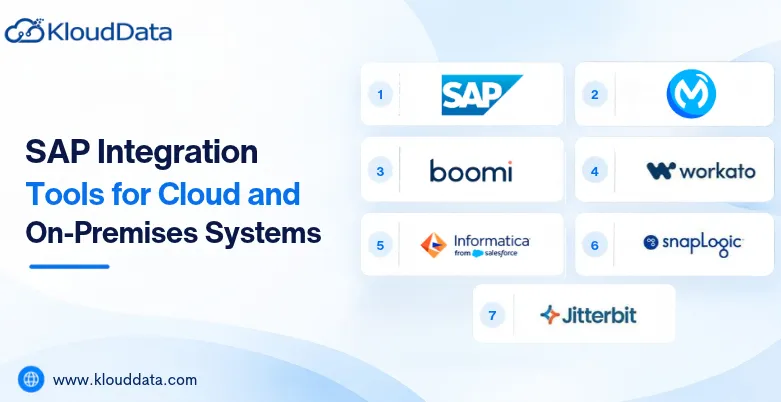
SAP integration tools help firms connect applications, databases, and enterprise systems to exchange data and streamline operations. As firms adopt cloud technologies while maintaining legacy infrastructures, reliable integration becomes necessary for keeping business processes connected. Advanced businesses require seamless connectivity between ERP platforms, CRM software, 3rd-party applications, and HR systems.
SAP integration tools help firms connect applications, databases, and enterprise systems to exchange data and streamline operations. As firms adopt cloud technologies while maintaining legacy infrastructures, reliable integration becomes necessary for keeping business processes connected.
Advanced businesses require seamless connectivity between ERP platforms, CRM software, 3rd-party applications, and HR systems. SAP integration services allow firms to establish these integrations through middleware, pre-built connectors, APIs, and automated workflows.
What Are SAP Integration Tools?
✤ How SAP Integration Tools Work
SAP integration tools allow smooth data transfer between corporate systems by integrating SAP and non-SAP applications. They use middleware, event-based integration, and APIs to allow bulk and real-time data transfers.
Additionally, the below SAP integration tools list allow firms to optimize operations in both on-premises and cloud environments. They automate workflows across connected apps, decrease human data entry, and increase information integrity.
✤ Why Businesses Need SAP Integration Tools
The SAP integration tools allow smooth data sharing between departments by connecting SAP and non-SAP applications.
It streamlines corporate procedures, minimizes manual data entry, and automates repetitive tasks.
The tool supports corporate innovation by integrating contemporary technologies with current SAP systems.
It gradually updates the infrastructure while connecting on-premises and cloud environments.
The best SAP integration tools improve departmental collaboration and supports well-informed decision-making by providing uniform, easily available information.
Types of SAP Integration Tools
❏ Cloud Integration Tools
Cloud integration technologies allow seamless data flow between SaaS platforms by integrating cloud-based services and applications. They simplify application communication, lower infrastructure maintenance, and provide scalable integration possibilities. These tools allow businesses to integrate SAP solutions with platforms for analytics, CRM, HR, and finances.
❏ On-Premises Integration Tools
Within an organization’s infrastructure, on-premises integration solutions integrate databases, legacy SAP systems, and internal enterprise applications. They offer more control over system setups, security, and data. Businesses with strict compliance regulations or well-established IT environments that require reliable data interchange.
❏ Hybrid Integration Tools
Cloud apps and on-premises SAP systems are connected by hybrid integration solutions, which allow smooth data transfer between environments. They enable companies to keep vital legacy systems while allowing cloud adoption. Organizations may create secure integration procedures, manage connectivity, and create a flexible architecture by using SAP cloud integration consulting services.
Top SAP Integration Tools for Cloud and On-Premises Systems
1. SAP Integration Suite

A cloud-based platform called SAP Integration Suite integrates SAP with third-party apps in both on-premises and cloud settings. It provides data transformation capabilities, event-driven integration, API management, and prebuilt integrations. By integrating SAP S/4HANA, SAP SuccessFactors, and other enterprise systems, businesses may streamline workflows, improve data consistency, and help with digital transformation.
2. MuleSoft Anypoint Platform

Businesses can integrate SAP apps with cloud services, legacy systems, and third-party apps with the help of MuleSoft Anypoint Platform. It offers integration tools, reusable connectors, and API management to make data transfer between enterprise settings easier. Businesses can improve integration flexibility, reusability, and visibility across intricate IT infrastructures by using MuleSoft.
3. Boomi

Boomi is a cloud-based platform for integrating SAP systems with corporate tools, online apps, and on-premises databases. Businesses may streamline integration projects with its low-code interface, prebuilt connectors, and process automation features. Boomi can help organizations decrease manual processes, increase operational efficiency, and synchronize data across SAP ERP and external applications. Additionally, it allows scalable integrations as business needs change.
4. Workato

Workato is a platform for automation and integration that integrates SAP apps with both on-premises and cloud-based business platforms. Reusable automation workflows are used to optimize corporate operations and data interchange. CRM, HR, finance, and customer support apps can all be connected to SAP. Its low-code methodology improves the automation of repetitive activities, improves teamwork, and simplifies integration for technical and business teams.
5. Informatica

Businesses can integrate SAP apps with databases, cloud platforms, and enterprise systems by using Informatica’s data integration solutions. Data transformation, data quality, data replication, and metadata management are among its capabilities. Informatica allows businesses to transfer and synchronize SAP data between various environments while preserving reliability and consistency. Businesses handling intricate data pipelines, analytics workloads, and extensive data integration needs may find it very helpful.
6. SnapLogic

SAP apps can be integrated to cloud services, on-premises systems, and third-party business solutions via SnapLogic’s intelligent integration platform. Application and data integration are made easier by its visual, low-code interface and reusable integration components. Companies can decrease manual data processing, automate operations, and synchronize data across platforms. Organizations looking to update integration procedures while accommodating hybrid IT infrastructures and changing business requirements may consider SnapLogic.
7. Jitterbit Harmony

SAP data integration tools known as Jitterbit Harmony helps companies integrate SAP systems with external data sources, on-premises infrastructure, and cloud apps. It offers API management, workflow automation, application connectivity, and visual integration design. Jitterbit can help organizations decrease repetitive operations, increase process efficiency, and streamline data transmission between SAP ERP and other enterprise systems. Its adaptable integration strategy accommodates hybrid environments and evolving business needs.
SAP Integration Tools for Cloud Environments
✦ Common Cloud Integration Use Cases
SAP S/4HANA Cloud integration- Streamline key business operations and synchronize enterprise data by integrating business apps with SAP S/4HANA Cloud.
SAP SuccessFactors integration- To integrate workforce data, payroll information, and employee records, integrate HR systems with SAP SuccessFactors.
SAP Ariba integration- Automate procurement, manage vendors, and increase purchase visibility by integrating SAP Ariba with ERP systems.
Salesforce integration- To synchronize customer data, sales orders, and financial information across corporate platforms, integrate Salesforce with SAP. It connects cloud platforms, automates processes, and preserves consistent data across enterprise apps using SAP integration solutions.
Microsoft Azure integration- To improve data processing, analytics, cloud workloads, and application communication, integrate SAP systems with Microsoft Azure services.
Third-party SaaS connectivity- It streamlines processes, coordinates corporate data, and improves cross-platform cooperation by integrating SaaS apps with SAP.
✦ Benefits of Cloud-Based SAP Integration
Faster deployment- With prebuilt connectors and ready-to-use integration procedures, cloud-based SAP integration tools allow rapid application integration for enterprises.
Greater scalability- Organizations can scale integration resources according to shifting workloads and business needs thanks to these solutions.
Lower infrastructure management- Cloud systems eliminate the need to manage intricate integration infrastructure and maintain specialized hardware.
Easier application connectivity- Standardized interfaces allow businesses to integrate SAP systems with SaaS apps and other cloud services.
Continuous updates- Regular upgrades are made to cloud-based integration platforms to improve their usefulness, security, and compatibility with new technologies.
SAP Integration Tools for Hybrid Environments
➦ How Hybrid SAP Integration Works
Cloud apps and on-premises systems like SAP ECC or SAP S/4HANA are integrated through hybrid SAP integration. It allows progressive cloud migration and secure data synchronization between environments. Businesses can gradually adopt cloud platforms, maintain critical legacy systems, and update certain applications without completely replacing their infrastructure.
➦ Common Hybrid Integration Scenarios
Hybrid SAP integration allows businesses to link SAP systems with Microsoft Azure or AWS, integrate SAP S/4HANA with third-party SaaS platforms, and connect SAP ECC with SAP SuccessFactors. Additionally, these interfaces integrate cloud apps with
internal databases, allowing improved coordination across enterprise systems running in various environments. It simplifies workflows and ensures consistent data transmission.
How to Choose the Right SAP Integration Tool
➤ Evaluate Your Existing SAP Landscape
Determine which SAP and non-SAP applications are currently being used by your company. Examine current interfaces, integration dependencies, and legacy systems to learn how data moves throughout your company. This evaluation assists you in determining compatibility problems and selecting a product that works with your existing infrastructure.
➤ Consider Your Deployment Strategy
Depending on your deployment plan, select the best tools for SAP integration. While on-premises technologies provide more infrastructure control, cloud-based solutions are better suited for companies implementing SaaS apps. Platforms for hybrid integration integrate the two environments, which makes them helpful for businesses that migrate their workloads to the cloud.
➤ Assess Integration Requirements
Before choosing a tool, consider your data quantities, API requirements, real-time processing needs, and number of connected applications. Take into account the requirements for data transformation, security, and compliance. Reducing unnecessary integration complexity and ensuring consistent data sharing are two benefits of matching these objectives with platform capabilities.
➤ Consider Future Scalability
Choose a tool that will help your company as its integration requirements increase. Take into account plans for cloud migration, business growth, the adoption of new applications, and growing workloads. Without necessitating significant architectural modifications or expensive replacements, a scalable platform helps support more integration and evolving data requirements.
SAP Integration Tools Use Cases Across Industries
➥ Manufacturing
To increase visibility throughout industrial operations, SAP integration technologies integrate ERP platforms with manufacturing systems. They support producers in tracking inventory, keeping an eye on production schedules, and coordinating purchases for increased operational efficiency. They also automate supply chain activities and synchronize production data.
➥ Retail
SAP integration tools are used by retail companies to integrate ERP systems with order management programs, payment systems, and eCommerce platforms. These integrations improve visibility across online and offline sales channels, coordinate inventory levels, update product information, and streamline order processing.
➥ Healthcare
SAP integration technologies are used by healthcare businesses to integrate operational databases, finance systems, and enterprise applications. These tools allow uniform information management and more effective resource planning. They streamline data interchange, automate administrative processes, and improve departmental coordination.
➥ Financial Services
SAP cloud integration tools are used by financial organizations to integrate accounting systems, compliance apps, and transaction processing platforms. These interfaces help businesses keep consistent records for audits and legal requirements. They allow rapid data transmission, automate financial reporting, and improve transaction visibility.
Cloud vs On-Premises SAP Integration Tools: Which Is Right for Your Business?
Compare infrastructure requirements: On-premises solutions demand that companies manage their own servers, networks, and resources, whereas cloud integration tools rely on provider-managed infrastructure.
• Compare scalability: While on-premises solutions could need more hardware and infrastructure improvements as integration requirements increase, cloud platforms allow flexible scaling based on workloads.
• Compare implementation complexity: While on-premises implementation could necessitate more configuration and specific IT knowledge, cloud integration frequently allows for faster deployment through prebuilt connectors.
• Compare maintenance requirements: On-premises environments need internal staff to manage upgrades, monitoring, and troubleshooting, whereas cloud providers usually handle platform updates and infrastructure maintenance.
• Compare security and governance: Cloud platforms offer managed security features, while on-premises technologies allow direct management over infrastructure. Appropriate governance policies, compliance procedures, and access restrictions are necessary for both.
Explain when a hybrid approach makes sense- Businesses that must integrate cloud apps and gradually update their current infrastructure while maintaining legacy SAP systems can benefit from hybrid integration.
Future Trends in SAP Integration
Integration Platform as a Service (iPaaS)- By providing scalable, cloud-based integration tools, prebuilt connectors, and centralized administration capabilities, iPaaS platforms will streamline SAP connectivity.
AI-powered integration- AI can help companies automate integration development, identify possible connectivity problems before they interfere with operations, detect data anomalies, and recommend workflows.
Event-driven architecture- SAP systems will be able to respond to business events quickly thanks to event-driven integration, allowing quicker decision-making and more responsive processes.
API-first integration- By allowing standardized communication across enterprise apps, cloud services, and third-party platforms, API-first methods will improve SAP integration.
Low-code/no-code integration- Business and IT teams will be able to create integrations more quickly with less manual coding thanks to low-code and no-code technologies.
Increased adoption of hybrid architectures- In order to gradually upgrade infrastructure while preserving crucial legacy applications, businesses will integrate cloud platforms with on-premises SAP systems.
Intelligent automation- AI, integration workflows, and business rules will all be combined in intelligent automation to eliminate repetitive tasks, increase accuracy, and optimize company operations.
Ready to Connect Your SAP Systems More Efficiently?
Select suitable integration tools to connect applications, unify cloud and on-premises systems, and streamline data exchange. The ideal SAP integration service can streamline workflows, improve data visibility, and support business growth. Streamline SAP integrations and build a scalable integration environment that adapts to changing business requirements.